Showing posts with label English. Show all posts

xText i18n Problem

450px-Xtext_logo Every software development team desires that their product gains world wide acceptance by users. In this manner, internationalization (you can understand why it has fancy abbreviation like i18n while typing this word) can be evaluated as critical aspect of the software development process. Couple of weeks ago, I had given xText project (oAW 4.3.1) a shot to make some M2T transformations. Like many of you (at least I think so) I usually examine introduction documents of any given project for the first try outs and xText was not an exception; [link]

I did very strictly passed the document over but I could not achieve even one single successful build. Consecutive attempts failed to change the result. I even tried (another vain attempt) oAW IDE distribution of the Eclipse against the possible configuration error. Let's take a look at generated error dump.

0    INFO  WorkflowRunner     - --------------------------------------------------------------------------------------
15   INFO  WorkflowRunner     - openArchitectureWare 4.3.1, Build 20090107-2000PRD
15   INFO  WorkflowRunner     - (c) 2005-2008 openarchitectureware.org and contributors
15   INFO  WorkflowRunner     - --------------------------------------------------------------------------------------
15   INFO  WorkflowRunner     - running workflow: generate.oaw
15   INFO  WorkflowRunner     - 
593  ERROR WorkflowRunner     - No getter or adder method for property 'invoke' in clazz 'org.openarchitectureware.xtend.XtendComponent' found. [invoke='org::openarchitectureware::xtext::XtextExtensions::fixTypes(xtextFile)' in org/openarchitectureware/xtext/parser/Parser.oaw:13] 
593  ERROR WorkflowRunner     - No getter or adder method for property 'invoke' in clazz 'org.openarchitectureware.xtend.XtendComponent' found. [invoke='org::openarchitectureware::xtext::XtextExtensions::complete(xtextFile)' in org/openarchitectureware/xtext/parser/Parser.oaw:24] 
593  ERROR WorkflowRunner     - No getter or adder method for property 'if' in clazz 'org.openarchitectureware.workflow.Workflow' found. Forgot to customize? [bean if in org/openarchitectureware/xtext/Backend.oaw:53] 
593  ERROR WorkflowRunner     - No getter or adder method for property 'inputSlot' in clazz 'org.openarchitectureware.emf.XmiWriter' found. [inputSlot='xtextFile' in org/openarchitectureware/xtext/Backend.oaw:86] 
593  ERROR WorkflowRunner     - No getter or adder method for property 'if' in clazz 'org.openarchitectureware.workflow.Workflow' found. Forgot to customize? [bean if in org/openarchitectureware/xtext/Backend.oaw:100] 
593  ERROR WorkflowRunner     - Workflow interrupted because of configuration errors.

If you're using Turkish as a regional setting of your OS, you always must be skeptic about the i18n problem. I can summarize problem as "At some cases, uppercase/lowercase conversion gives different result in Turkish and English Languages". If you're interested in, i18n Guy gives more detailed information about that and also as usual, wikipedia has something to say. I solved xText build problem by migrating my regional settings to English but I think this is fatal i18n bug for xText project and must be handled as soon as possible.

70 Years of Gaming Foresight

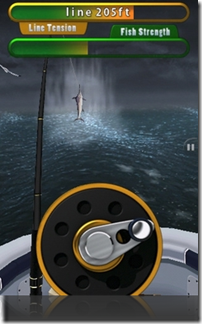
Recently I've stumbled upon "45 Vintage ‘Space Age’ Illustrations" post of Wellmedicated. Some of these creative works resemble popular gadgets of today but one of them is further than them:


pop_science  

1938 - Movies Train Big-Game Fishermen

iphone_fishing

2008 - iPhone Flick Fishing

Large Hadron Collider Game

Large Hadron Collider (LHC) of CERN (European Organization for Nuclear Research) is very popular subject nowadays. Beyond the scientific value of the subject, it has vastly hazardous perception in public domain (The 5 Scientific Experiments Most Likely to End the World). We have to get general idea about a particle accelerator before commenting about the impact factor of the LHC experiment. Therefore, interactive science centre of CERN provides very educational game, LHC game:


LHC_game

Macbook Air Parody of Lenovo

Thanks to Murat for pointing this ad to me. Also, you can read Steve's post about this video.

Big Brother is Doting You

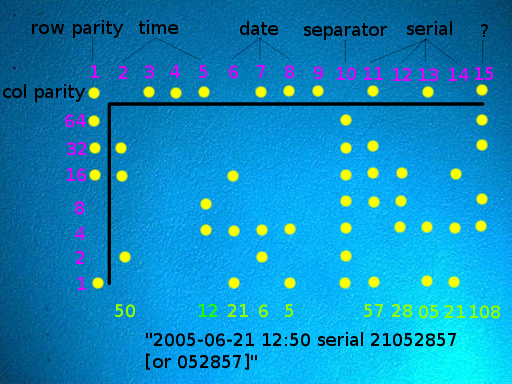
eff_printer Recently, I've stumbled to Rob Cockerham's "Introducing the Eyeclops: Super Magnifying Camera" page. Rob really has fun with his amazing 200X toy; Eye Clops Bionic Eye. He did some try outs with casual living room materials; magazines, shirts, hair, etc... After that, he unveiled secret yellow dots on printings (by the way; he used to have print shop job, also).

The issue is that many printers embed some tracking information into the printouts. The embedded information contains date, time, serial number, etc... (enough for watched by big brother). The information is encoded and printed by yellow dots (not viewable without magnifying) across the page.  Electronic Frontier Foundation (EFF) reported decoding method and sample implementation on this page.

The first printer that I purchased in 1995 was HP 690C. I remember that it had been mentioned as not to be able to print dollar($) green tone. That can be evaluated as reasonable limitation. However, a printer that spying on its owner is really inappropriate for me. I think that we all deserve little more privacy and we should prefer the printers do not embed tracking dots to purchase. In this respect, EFF's list is very handy resource; "List of Printers Which Do or Do Not Display Tracking Dots".

(Image source: http://www.eff.org)

Young Turks vs. Jeunes Turcs

I've encountered interesting comment thread on NetworkWorld as reading "5 IT skills that won’t boost your salary" article. User naedrod, has stated his/her opinions by using contrary phrases "Young Turk" and "Dino". Unfortunately, this opinion has caused misconception on the other user. This case and RandomHouse's definition for "Young Turk" phrase, pushed me to think about usages. RandomHouse defines that;

Young Turks, which was the popular name for the Committee of Union and Progress, a revolutionary reformist group that led a successful rebellion in Turkey in 1908 and held power for another decade or so.

In Turkish, we generally use French word for this phrase; "Jön Türk" (Jön = homonym of "Jeune" which means "Young" in French). Therefore, "Genç Türk" which is the exact translation of the "Young Turk" is nonsense, generally (I think, this fact results misconception). Refer to Wikipedia article for further information about "Young Turks".

If you've never failed, you've never lived

YouSort: YouTube Sort by View Count Fix

Update(2008.04.10): Fortunately, YouTube added sort by view count feature again hence, this post is expired. However, I let it remains for possible further reference.


Title is very descriptive and it refers to common problem; every YouTube user wants to sort filtered video results by "view count" and there is a trivial solution. Note that, this is not "yet another view count fix entry". If you google this issue, you can access many blog entries about that. However, this fix is relatively more permanent solution.


YouTube removed the "sort by view count" feature from its user interface but feature is still available. You can still use this feature (although, this time in less user friendly fashion). After searching at YouTube, append &search_sort=video_view_count at the end of the URL in the address bar and press enter to search again. Hence, results will be view count sorted at this time.


In order to make this solution more permanent (easily repeatable), I implemented below solution (Screenshots are from Firefox but steps cover both Firefox and IE - Internet Explorer):

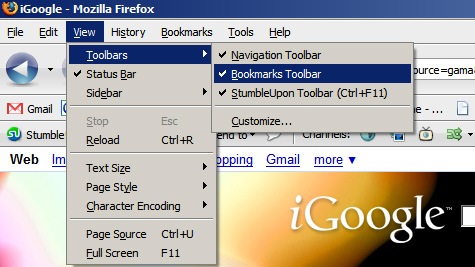
1. Be sure that "Bookmarks Toolbar" is visible by checking View > Toolbars > Bookmarks Toolbar (IE: View > Toolbars > Links).


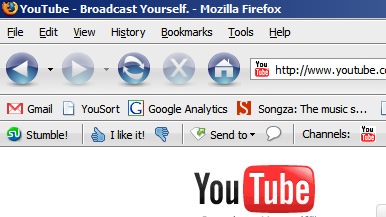
yousort_1 


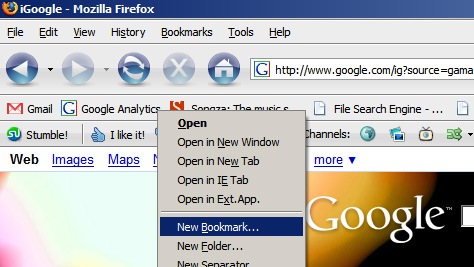
2. Open "New Bookmark" dialog by right clicking Bookmarks Toolbar and select "New Bookmark..." (IE: Favorites > Organize Favorites... right click unused item under "Links" folder and click to "Properties").


yousort_2 


3. In this bookmark, we want to append &search_sort=video_view_count prefix to current URL and redirect to this new address. We can handle this operation with below JavaScript code snippet.


javascript:window.open(document.location + %22&search_sort=video_view_count%22);

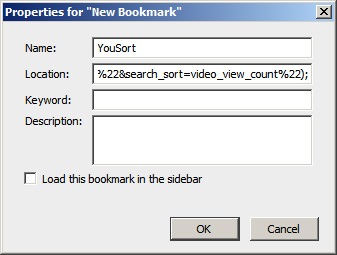
4. Give appropriate name (for this case: "YouSort") for bookmark and paste above snippet to the "Location" field (IE: Insert the snippet into "URL" field).


yousort_3


5. Sort by view count button for YouTube is ready to use. You can use this button at search result pages (IE: Use Firefox ;) ).


yousort_4


Have fun...


Student Autonomous Underwater Challenge

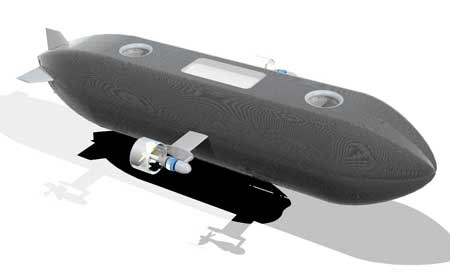
auv9 AUVs (Autonomous Underwater Vehicle) are unmanned, untethered submersible robots that are capable of carrying out missions autonomously. Defence Science and Technology Laboratory (DSTL) which is executive agency of the UK Ministry of Defence, supports AUV development projects of the students. In this respect,  DSTL arranges "Student Autonomous Underwater Challenge - Europe (SAUC-E)" annually.

This year SAUC-E 2008 is to be hosted by DGA (France) and held at IFREMER, Brest, France in 7 - 11 July 2008. Soton AUV of the Southampton University is the winner of the SAUC-E 2007. Comprehensive project list of some organizations can be found here.

(Image source: http://sotonauv.seslink.soton.ac.uk/)

How to make HTTP connection in J2ME

One of the most critical aspects of J2ME is network connectivity. Although J2ME devices can be useful when they are not connected to a network, the ability to make a network connection provides a means to tap into the powerful resources available on a network. In other words, a client-server paradigm is used to offload complicated work from the limited capabilities of the MIDP device to the more capable server environment.

Since network connectivity is so vital to J2ME it is important that the architecture be extendible to many different protocols while allowing applications to be portable across many devices. (MIDP 1.0 specification supports only HTTP connection) The piece of software within the J2ME architecture that addresses network connectivity is called the Generic Connection Framework (GCF). The Generic Connection Framework resides in the javax.microedition.io

  • DatagramConnection : Manages a datagram connection.
  • InputConnection : Manages an input stream-based connection.
  • OutputConnection : Manages an output stream-based connection.
  • StreamConnection : Manages the capabilities of a stream. Combines the methods of both InputConnection and OutputConnection.
  • ContentConnection :Manages connection for passing content, such as HTML or XML. Provides basic methods for inspecting the content length, encoding and type of content.

Let’s talk about more specific sample, below code snippet demonstrates simple HTTP connection. First crucial point in snippet, connection type casting. How the Connector knows the right connection class? Answer is very forthright; when the URI is defined in open, Connector parses it (schema, address and parameters) and decides the class. For instance “http” token refers to HttpConnection class.

   1: String url = new String("http://sample.cs.hacettepe.edu.tr:1234/pusu/pusunotifier");
   2: try {
   3:     con = (HttpConnection) Connector.open(url);
   4:     con.setRequestMethod(HttpConnection.POST);
   5:     out = con.openOutputStream();
   6:     out.write(stringData.getBytes());
   7: } catch (IOException exp) {
   8:     // Handle IOException
   9: }
  10: // Final snippet 

Building HTTP header is another vital aspect of the connection. For MIDlet-to-Servlet connections, that’s quite simple, all you needed defining HttpConnection.POST in seRequestMethod. What about MIDlet-to-PHP interaction? That’s offtopic for this tutorial but I can briefly say that you have to build HTTP header manually. This method covers setting Boundary, Content-Disposition, Content-Type, etc… (That's valid for hybrid transmission. Only string based data transmission can be handled without manual building).

For client side final point is closing connection resources to avoid lack:

   1: // Connection snippet
   2: finally {
   3:     try {
   4:         if (out != null) {
   5:             out.close();
   6:         }
   7:         if (con != null) {
   8:             con.close();
   9:         }
  10:     } catch (IOException exp) {
  11:         // Handle IOException
  12:     }
  13: }

That’s all for the client side application. Let’s review implemented part of the application; client constructs sending data, requests HTTP connection and transmits concerning data. Server side requirements; establishing HTTP connection, receiving transmitted data and process it.

   1: public class PusuNotifier extends HttpServlet {
   2:     public void doPost(HttpServletRequest request, HttpServletResponse response) {
   3:         InputStream input = request.getInputStream();
   4:         BufferedReader bufReader = new BufferedReader(new InputStreamReader(input));
   5:         StringBuffer stringBuf = new StringBuffer();
   6:         String line;
   7:         while ((line = bufReader.readLine())!=null) {
   8:             stringBuf.append(line);
   9:         }
  10:         String receivedData = stringBuf.toString();
  11:         // Process received data
  12:     }
  13: }

Establishing connection is provided by container (server) application for Servlets so this requirement has been skipped. Standart HttpServlet specification defines doPost method in order to handle post requests and HttpServletRequest argument to encapsulate client’s request.

Receiving data via BufferedReader is a generic way to handle transmission. (Although it’s suitable way for hybrid transmission, not the only way). Finally, received data is server side and ready to be processed.

Originally posted by Orçun Dayıbaş in 2005.04.25 - The Pusu Project Blog

How to send SMS in J2ME?

Pusu will report the motion several ways. Via SMS, MMS, Bluetooth. The simplest one is SMS so firstly we do SMS to report. With WMA, sending SMS in J2ME very simple. A generic MessageConnection opens the reporting way to connect the desired user about the situation. The receiving section comes with some obstacles. Since we want our Motion Detector controlled by simple SMS which is sent by an ordinary mobile phone message, the application should access the SMS messages targetted towards it. But an application running on the mobile phone is listenning to the messages which is specified to its port number. Unfortunately, at the time being we could not find a decent way to specify an SMS message which is not only defines the phone number but also the port number of the application. We will work on that matter. Now we explain the SMS reporting of the system.

WMA is supported through javax.microedition.messaging package, which includes the interfaces below:

Message: The basic interface for a message. Commonly needed methods are defined such as the ability to get or set the address associated with the message and to retrieve the timestamp of when the message was sent.
BinaryMessage: Extends the Message interface, allowing an application to extract the binary payload of the message.
TextMessage: Extends the Message interface, allowing an application to extract the ASCII payload of the message.
MessageConnection: Supports the functionary for sending and receiving messages based on the underlying protocol.
MessageListener: Allows classes that implement this interface to register with an instance of MessageConnection to be notified when a new message is received.

Sending SMS with WMA (Wireless Messaging API) is done as below code: 

   1: //destination is the user specified mobile phone number


   2: // an example for destination = "+905335555555"


   3: String addr = "sms://" + destination;


   4: MessageConnection sender = null;


   5: try {


   6:     try {


   7:         //connection creation


   8:         sender = (MessageConnection) Connector.open(addr);


   9:         //message creation


  10:         TextMessage msg = (TextMessage) sender.newMessage(MessageConnection.TEXT_MESSAGE);


  11:         //message is load


  12:         msg.setPayloadText(message);


  13:         //send it


  14:         sender.send(msg);


  15:     } finally {


  16:         sender.close();


  17:     }


  18: } catch (Exception ex) {


  19:     //handle exception 


  20: }


No matter which protocol you are using, the messaging operations are nearly the same. There is a minor difference between SMS and CBS. SMS listens to a port where CBS listens to a channel.

Specific to Pusu, when the motion detection system detects a motion, the reporter class is invoked. Reporter class can have various implementations according to the user definition for reporting. The destination phone number is also defined by user. The message to be send is build by the application.

Originally posted in 2005.03.30 by Cahit Güngör - The Pusu Project Blog

J2ME Camera Speed Evaluation

Research Group Embedded Interaction has evaluated getting snapshot speed of the Nokia 6600 by J2ME code. This evaluation covers different encoding formats (PNG, BMP and JPEG) and resolution sizes (80x60, 160x120 and 200x150) with durations between one and ten seconds. The following tables show the results of the different simulations:

 
Format of the image: PNG

clip_image002


Format of the image: BMP

clip_image004


Format of the image: JPEG

clip_image006

byte[]jpegImageData=videoControl.getSnapshot (“encoding=jpeg&width=120&height=90”);

Above results are all involves the explicitly specified resolutions in their "getSnapshot" methods like above. What about a default resolution? (null value for diemnsions) The result is amazing. Performance increased by four times! (for ten minutes duration) The quality of the image remains same as before.


BMP and default resolution:

clip_image008


Originally posted by Orçun Dayıbaş in 2005.02.19 - The Pusu Project Blog

The Pusu Project

logo_wpOne of the main motivations of starting that blog is loss of my old one (hosted by the university that eagerly needed an extra 10 MB server space and deleted all "relatively old" accounts without any notice).


Anyways, as a software engineer, I always backup (and barely remember where to find ;) ) my works and development notes of the Pusu Project is no exception... I will -at least partially- repost them here as soon as possible


P.S.1: The expired URL of the Pusu Project development blog is http://web.cs.hacettepe.edu.tr/~b20021809/project/pusu

P.S.2: Pusu is the world's first 100% managed J2ME motion detection application (project has been completed in 2005).

P.S.3: I want to acknowledge my project colleague Cahit Güngör and project supervisor Kayhan İmre.